Skip to content
  • MySensors
  • OpenHardware.io
  • Categories
  • Recent
  • Tags
  • Popular
Skins
  • Light
  • Brite
  • Cerulean
  • Cosmo
  • Flatly
  • Journal
  • Litera
  • Lumen
  • Lux
  • Materia
  • Minty
  • Morph
  • Pulse
  • Sandstone
  • Simplex
  • Sketchy
  • Spacelab
  • United
  • Yeti
  • Zephyr
  • Dark
  • Cyborg
  • Darkly
  • Quartz
  • Slate
  • Solar
  • Superhero
  • Vapor

  • Default (No Skin)
  • No Skin
Collapse
Brand Logo
bgunnarbB

bgunnarb

@bgunnarb
About
Posts
101
Topics
10
Shares
0
Groups
0
Followers
1
Following
1

Posts

Recent Best Controversial

  • No merge into master in the last 5 years, should we use development?
    bgunnarbB bgunnarb

    Well, my network with two handfulls of nodes in three different locations is still live and kicking! I agree that there does not seem to be a lot happening in the community. I'm running 2.4.0- alpha since this gives support for MQTT over TLS. Just managed today to create one more MQTT GW after reading a lot about support for ESP8266. You know, these things you do once per year and have to learn new each time.

    MySensors is the cheapest way I have found to create small sensor nodes etc. But now slowly running out of my supply of hardware. Well, time will tell...

    General Discussion

  • MQTT GW on ESP8266 supporting SSL/TLS?
    bgunnarbB bgunnarb

    @eiten
    Hi Edi!
    You are an absolute STAR!
    Now I'm on the development branch 2.4.0 alpha and things work like a charm!
    I'm able to connect via SSL/TLS to a commercial broker account with a server certificate and messages have started flowing in the test rig.
    Now it's time to plan the migration of my MQTT clients.
    Thank you so much for pointing me in the right direction. I thought that TLS support was implemented in the master branch and could not understand why things did not work?
    Can I buy you a beer?

    Best regards
    /Gunnar

    Development mqtt gw esp8266

  • MQTT GW on ESP8266 supporting SSL/TLS?
    bgunnarbB bgunnarb

    Hi Edi!
    I'm on the master branch.
    Regards /Gunnar

    Development mqtt gw esp8266

  • GatawayESP8266 - Compile error
    bgunnarbB bgunnarb

    @eiten Ran into the same error but of course the community is always at hand, ready to help! Great! I'm using MySensors 2.3.2 release version. Downgrading the ESP8266 board library to 2.7.4 as suggested by @OldSurferDude did the trick.
    I'm still clinging to MySensors. So simple and inexpensive to use! All sensors and other stuff connects over three MQTT GW in three locations back to my Home Assistant.
    PS: Get well soon!

    Regards, Gunnar

    General Discussion gatawayesp8266 compile error

  • MQTT GW on ESP8266 supporting SSL/TLS?
    bgunnarbB bgunnarb

    I have been using a couple of ESP8266 MySensors MQTT GW for years, connected to a public broker. Now unfortunately they will no longer support a simple connection to port 1883 but will require a secure connection using TLS.
    Question: Is there code available for the ESP8266 MQTT GW with support for SSL/TLS? How would you go about adding that support?

    Since I have three GW in different places I cannot deploy my own mosquitto broker on my HA installation.

    Development mqtt gw esp8266

  • Gateway sends NACK to node
    bgunnarbB bgunnarb

    Can you paste the code for the node please?
    Just a hint: Have you set the node ID manually? HA does not assign node ID automatically as far as I know. You have to set it manually in the code using:

    #define MY_NODE_ID 23
    

    Node-ID is a number between 1 and 254, unique to each node. The default is AUTO which requests an ID from the controller. HA does not assign node ID.

    Troubleshooting gateway

  • Can a sensor "get lost" between a GW and a repeater?
    bgunnarbB bgunnarb

    Thanks to @electrik and @mfalkvidd for your answers. I will try next time I have the opportunity. Currently the sensor is 400 km away from home.

    Troubleshooting repeater

  • Can a sensor "get lost" between a GW and a repeater?
    bgunnarbB bgunnarb

    I have a battery operated sensor that is placed at a distance to the GW where it should get a good connection. Distance is only 5 meters with wooden walls in between. But very close to this sensor is another sensor with the REPEATER function enabled. The first sensor connects to the GW but looses contact after a few hours. After a reset of the sensor, it functions again.

    Question: Could the case be, that the battery operated sensor loses the path to the GW i.e. the routing is lost somehow if it starts oscillating between connecting to the GW and the repeater?

    I have checked obvious causes of failure like wiring, capacitor etc.

    If the answer is no, then I have other things to check. I just want to rule out this cause of failure.

    Troubleshooting repeater

  • Problems ethernet GW with ESP8266- NodeMcu V3.4
    bgunnarbB bgunnarb

    I also edited according to @Yveaux 's workaround and it works!

    I found however that in order to get the MQTT GW to listen to messages and forward them to the broker, I had to set wait(2000); in the void loop()
    If I set wait(0) the GW started but did not listen to messages. If I set wait(100); the GW started spamming the broker with the presentation message.

    Again, a big thank you to everybody involved. "Now we are cooking with gas again!"

    Troubleshooting

  • Problems ethernet GW with ESP8266- NodeMcu V3.4
    bgunnarbB bgunnarb

    I have exactly the same problem with the ESP8266 MQTT GW. It compiles and loads but there is nothing on the serial output. The ESP does not appear on the WiFi either. I have run other sketches like the NTP-server and the Blink sketch with exactly the same settings for the compiler. There is no difference if the radio is connected or not. My wiring is very simple, nothing connected except the micro-USB.
    The suggestion by @peripi makes no difference. The bootload message comes at 74880 speed. Shifting to 9600 or setting any other speed for that matter makes no difference.

    Since I have compiled and run this same sketch earlier, I suspect there have been some breaking changes in the library version 3.0.2 or possibly elsewhere.

    I post my code below but I think it is identical to the reference sketches on MySensors.

    /**
     * The MySensors Arduino library handles the wireless radio link and protocol
     * between your home built sensors/actuators and HA controller of choice.
     * The sensors forms a self healing radio network with optional repeaters. Each
     * repeater and gateway builds a routing tables in EEPROM which keeps track of the
     * network topology allowing messages to be routed to nodes.
     *
     * Created by Henrik Ekblad <henrik.ekblad@mysensors.org>
     * Copyright (C) 2013-2015 Sensnology AB
     * Full contributor list: https://github.com/mysensors/Arduino/graphs/contributors
     *
     * Documentation: http://www.mysensors.org
     * Support Forum: http://forum.mysensors.org
     *
     * This program is free software; you can redistribute it and/or
     * modify it under the terms of the GNU General Public License
     * version 2 as published by the Free Software Foundation.
     *
     *******************************
     *
     * REVISION HISTORY
     * Version 1.0 - Henrik Ekblad
     * Version 1.1 - Gunnar Blockmar 2019-05-19 Configuration for Sjövik WLAN
     * 
     * DESCRIPTION
     * The ESP8266 MQTT gateway sends radio network (or locally attached sensors) data to your MQTT broker.
     * The node also listens to MY_MQTT_TOPIC_PREFIX and sends out those messages to the radio network
     *
     * LED purposes:
     * - To use the feature, uncomment WITH_LEDS_BLINKING in MyConfig.h
     * - RX (green) - blink fast on radio message recieved. In inclusion mode will blink fast only on presentation recieved
     * - TX (yellow) - blink fast on radio message transmitted. In inclusion mode will blink slowly
     * - ERR (red) - fast blink on error during transmission error or recieve crc error  
     * 
     * See http://www.mysensors.org/build/esp8266_gateway for wiring instructions.
     * nRF24L01+  ESP8266
     * VCC        VCC
     * CE         GPIO4          
     * CSN/CS     GPIO15
     * SCK        GPIO14
     * MISO       GPIO12
     * MOSI       GPIO13
     *            
     * Not all ESP8266 modules have all pins available on their external interface.
     * This code has been tested on an ESP-12 module.
     * The ESP8266 requires a certain pin configuration to download code, and another one to run code:
     * - Connect REST (reset) via 10K pullup resistor to VCC, and via switch to GND ('reset switch')
     * - Connect GPIO15 via 10K pulldown resistor to GND
     * - Connect CH_PD via 10K resistor to VCC
     * - Connect GPIO2 via 10K resistor to VCC
     * - Connect GPIO0 via 10K resistor to VCC, and via switch to GND ('bootload switch')
     * 
      * Inclusion mode button:
     * - Connect GPIO5 via switch to GND ('inclusion switch')
     * 
     * Hardware SHA204 signing is currently not supported!
     *
     * Make sure to fill in your ssid and WiFi password below for ssid & pass.
     */
    
    #include <EEPROM.h>
    #include <SPI.h>
    
    // Enable debug prints to serial monitor
    #define MY_DEBUG 
    
    // Use a bit lower baudrate for serial prints on ESP8266 than default in MyConfig.h
    #define MY_BAUD_RATE 9600
    
    // Enables and select radio type (if attached)
    #define MY_RADIO_RF24
    //#define MY_RADIO_RFM69
    
    #define MY_GATEWAY_MQTT_CLIENT
    #define MY_GATEWAY_ESP8266
    
    // Set this nodes subscripe and publish topic prefix
    #define MY_MQTT_PUBLISH_TOPIC_PREFIX "prefix-out"
    #define MY_MQTT_SUBSCRIBE_TOPIC_PREFIX "prefix-in"
    
    // Set MQTT client id
    #define MY_MQTT_CLIENT_ID "sensors"
    
    // Enable these if your MQTT broker requires usenrame/password
    #define MY_MQTT_USER "hidden"
    #define MY_MQTT_PASSWORD "xyz123"
    
    // Set WIFI SSID and password
    #define MY_WIFI_SSID "secret"  // Change this at deployment
    #define MY_WIFI_PASSWORD "secret"   //Change this at deployment
    
    // Set the hostname for the WiFi Client. This is the hostname
    // it will pass to the DHCP server if not static. 
    #define MY_HOSTNAME "test-gateway"
    
    // Enable MY_IP_ADDRESS here if you want a static ip address (no DHCP)
    //#define MY_IP_ADDRESS 192,168,178,87
    
    // If using static ip you need to define Gateway and Subnet address as well
    //#define MY_IP_GATEWAY_ADDRESS 192,168,178,1
    //#define MY_IP_SUBNET_ADDRESS 255,255,255,0
    
    
    // MQTT broker ip address.  
    //#define MY_CONTROLLER_IP_ADDRESS 192, 168, 178, 68
    #define MY_CONTROLLER_URL_ADDRESS "xxx.cloudmqtt.com"
    
    
    // The MQTT broker port to to open 
    #define MY_PORT 12345      
    
    
    // Flash leds on rx/tx/err does not work on ESP8266 no free pins
    // #define MY_LEDS_BLINKING_FEATURE
    // Set blinking period
    // #define MY_DEFAULT_LED_BLINK_PERIOD 300
    // Enable inclusion mode
    // #define MY_INCLUSION_MODE_FEATURE
    // Enable Inclusion mode button on gateway
    // #define MY_INCLUSION_BUTTON_FEATURE
    // Set inclusion mode duration (in seconds)
    // #define MY_INCLUSION_MODE_DURATION 60 
    // Digital pin used for inclusion mode button
    // #define MY_INCLUSION_MODE_BUTTON_PIN  3 
    // #define MY_DEFAULT_ERR_LED_PIN 1  // Error led pin
    // #define MY_DEFAULT_RX_LED_PIN  9  // Receive led pin
    // #define MY_DEFAULT_TX_LED_PIN  0  // Transmit led pin
    
    
    #include <ESP8266WiFi.h>
    #include <MySensors.h>
    
    void setup() { 
      
    }
    
    void presentation() {
      // Present locally attached sensors here    
    }
    
    
    void loop() {
      // Send locally attached sensors data here
    }
    

    So at the end of my wits.

    Troubleshooting

  • 3D printed housing for an MQTT-GW
    bgunnarbB bgunnarb

    @evb Done that. Here is the link

    Enclosures / 3D Printing

  • 3D printed housing for an MQTT-GW
    bgunnarbB bgunnarb

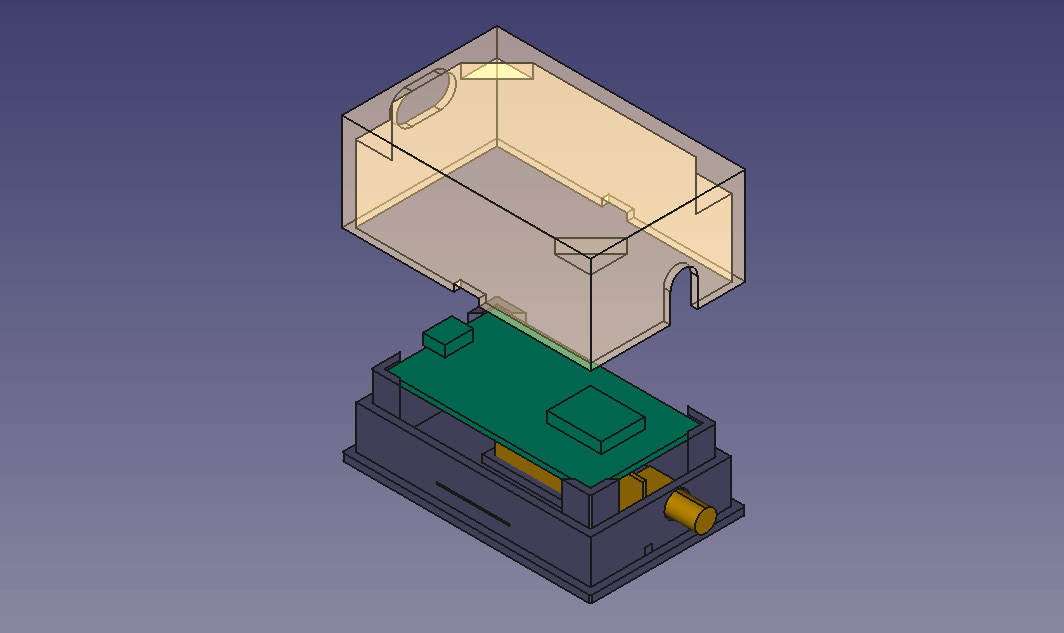
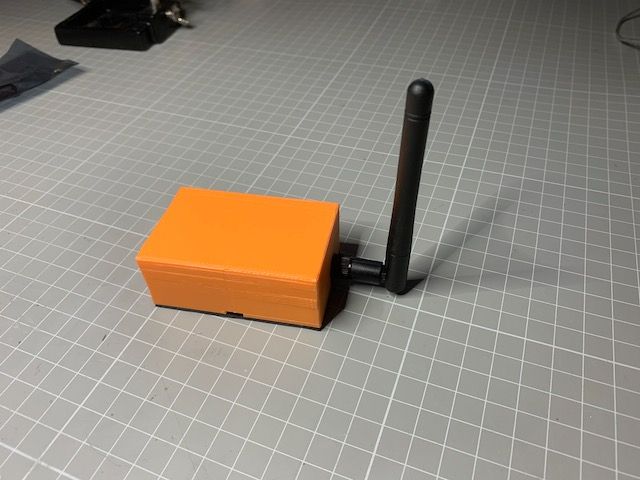
    I recently designed a housing for my MQTT-Gateway, based on an ESP8266 module (Node-MCU) and an nRF24L01+PA+LNA. The housing printed great using PLA on my FF Creator Pro. Connections are made using Dupont cables cut in half and soldered directly to the nRF24 where the pins have been removed. I enclose a picture from FreeCad and a link to the stl-files on Github for the base and the cover.

    Screenshot 2020-12-21 at 11.41.02.png

    IMG_0670.jpeg

    Enclosures / 3D Printing

  • MySensors --> MQTT --> OpenHab 2.5
    bgunnarbB bgunnarb

    Let me offer my thoughts and recommendations:

    For myself I have been using MQTT as the connection method for a number of years.

    Doing that, you must have an MQTT broker as the "middle-man" to receive MQTT messages from the MySensors MQTT gateway and then relaying them to OH, which then uses the MQTT binding. Then you do not use the MySensors binding to OH at all.

    The advantage is that you can have a number of sources/sensors feeding information to the MQTT broker. In my case I have three geographical sites with MySensors nodes, each with an MySensors MQTT gateway, feeding the broker. Actually at one of the sites there is also a Sonoff switch that also reports status and gets commands via MQTT. (I am using the Espurna SW on the Sonoff).

    Then my OH installation subscribes to the broker via the OH MQTT binding.
    To dive deeper into details, because of this geographical set-up, I am using a commercial MQTT broker, which is accessible over the internet from all three sites. If you only operate one site, then you are better off using e.g. Mosquitto inside your firewall.

    As far as I understand the OH MQTT binding does not offer auto-discovery unless you use the Homie naming convention. Check the OH documentation please.

    For MySensors nodes I use the MySensors notation so a typical message looks like: mqttgw1/28/3/1/0/0 23.2 for say, a node-ID 28 and child-ID 3 that reports a temperature of 23.2 °C

    When I started using MQTT and the 1.0 binding I made all definitions in the .items text file but when I converted to MQTT 2.0 I have made all the definitions in the PaperUI. It is either/or depending on your preferences but I think the general recommendation in the OH community is to use the PaperUI.

    If you stick with text files I strongly recommend that you use Visual Studio Code and the OpenHAB extension to VS. Then you get syntax checking and nice colours to all keywords.

    As far as I understand, the MySensors OH-binding uses the ethernet or serial MySensors GW. Probably the set-up is simpler in the beginning but offers less flexibility in the long run. I could never have achieved my set-up above using just a serial connection.


    OpenHAB

  • Home Assistent + Serial Gateway + Motion Sensor
    bgunnarbB bgunnarb

    I'm not very good with HA but in the GW sketch, to me it seems that you test if the Arduino is running on 8 MHz (#if F_CPU == 8000000L), which I guess it is not. So the #DEFINE MY_BAUD_RATE 115200 is never executed.

    So then the GW runs at what baud rate?

    Try to move the #DEFINE outside of the #if -- #endif and maybe set a lower baud rate, also in the HA .yml

    Home Assistant

  • Is MQTT Necessary? or, Use Case for MQTT?
    bgunnarbB bgunnarb

    @UglyKidJoe
    I have been using OpenHAB and MQTT for a number of years now.

    The reason for using MQTT and not just a serial connection from the MySensors GW is partly the flexibility as many have stated previously here. Easy to test, using e.g. the mqtt.fx tool. If you want to know what is going on you simply connect to the MQTT stream and "snoop" on the messages.

    Another reason is that I am running three geographical sites on one OH installation. OH is running on a NUC at my home. There is also an MQTT GW here. Two other My Sensors MQTT-GW are running remotely in two summer houses. The three GW connect over internet to a cloud-based MQTT broker and OH connects to the same broker. In that way I do not have to open any ports into my home network for access should I have had a local MQTT-broker at home.

    Controllers mqtt mqtt openhab gateway openhab

  • DHT11, W5100, OLED display node
    bgunnarbB bgunnarb

    Did you try commenting out #define MY_DEBUG ?
    That might save you a few bytes.

    My Project

  • Loosing relays state after OH restart
    bgunnarbB bgunnarb

    OK!
    Sorry but I cannot help you there. I don't know enough about the Serial GW. At least it seems OH is doing the right thing.

    OpenHAB

  • Loosing relays state after OH restart
    bgunnarbB bgunnarb

    @Dawidi
    Do you persist the relay states? This will make the previous state of the relays known after a restart of OH.
    Check this information: https://www.openhab.org/docs/configuration/persistence.html

    OpenHAB

  • Arduino with voltage regulator
    bgunnarbB bgunnarb

    Filtering the power lines on input and output is generally not a critical issue when it comes to the value of the capacitors unless you plan to produce a large number of boards when cost of components become the issue.

    If you are looking for a trouble-free operation it is better to be safe than sorry and to be conservative in the dimensioning. So 10 uF on the output is better than 2.2 since it provides more filtering of low frequency noise. 0.1 uF is better than 470 pF since it provides more filtering of high frequency noise. 10 uF on the input also filter out spikes in the input power, should there be any, so that they do not pass through the regulator. It is good practice to have both a 10 uF and a 0.1 uF capacitor on the output since they have different electrical capabilities to filter low and high frequency noise.

    So in essence, the value of filtering capacitors is not that critical most of times. Too little filtering could give you issues with the radio, which is sensitive to noise on the power lines. This is why there always should be a capacitor of at least 4.7 uF close to the radio power input.

    Hardware

  • Trouble with the JSN SR04T
    bgunnarbB bgunnarb

    Yes, I take five consecutive readings 100 ms apart and calculate the median value of the readings that fall within allowed limits. Off-scale readings are discarded before calculating the median value.

    It has been running for two weeks now and seems to be accurate and stable.

    Troubleshooting
  • Login

  • Don't have an account? Register

  • Login or register to search.
  • First post
    Last post
0
  • MySensors
  • OpenHardware.io
  • Categories
  • Recent
  • Tags
  • Popular