
@axillent - Nice to see you here again! Well done :+1:
Posts
-
AC-DC at own -
vera ,the green dead brick@tmaster The OpenHab website has some info about zwave shield(s) and Fibraro device compatibility here https://docs.openhab.org/addons/bindings/zwave1/readme.html#fibaro-door-contact-fgk-101
-
vera ,the green dead brick@tmaster You'll probably have better luck posting to the Vera forums or sending an email to support@getvera.com.
Also, depending upon your z-wave nodes, you may find that the z-wave shield doesn't work reliably with all nodes because it uses a reverse-engineered protocol with known limitations to avoid licensing issues.
-
Which 3D modelling software do you prefer for 3D printing *and* CNC?FreeCAD is a leading contender too - opensource (like mySensors and KiCAD), with a very active development community, forums and workbenches for almost any problem domain. It runs on Windows, Linux and macOS and I use it for all my 3D printing needs using a LulzBot 3D printer. The path workbench (for CNC machines) is one of the most dominant areas of development right now and is very mature. The developers are very responsive in the forums and on Gitter along with a lot of community members who constantly help newcomers and seasoned professionals use the product proficiently. It has a built-in python interpreter making it very easy to extend ranging from macros/scripts, community developed add-ons to workbenches for various domains such as stress analysis. FreeCAD is also the basis for the 3D parts/models for KiCAD.
The nice thing about opensource is that the models can be shared freely and openly and if you want to understand how something works or you even want to improve it, you can engage the developers and/or submit a pull request on GitHub.
-
Freezer temp monitor with buzzer, can I set the high temp limit via Vera?@signal15 Sorry for your significant meat loss.
You might want to take a look at the TempLeakSensor device luup files on the Vera for ideas. They declare a security device that can be armed/disarmed and associated temp and water events used to detect a freeze or leak respectively. In your case, you would create a TempSensor device that could be armed and disarmed and define a custom variable for that device that defines the trip temperature. Whenever the luup temp variable for that device is modified using the vera UI, you would send the updated trigger temp to the sensor node.
The advantage of this approach is that you can use your TempSensor to trigger scenes when armed (e.g. freezer door is closed) and the current temp exceeds the trigger temp akin to how motion sensors are used. In addition, it would act as a normal temp sensor reporting the current temperature to your vera that you could plot over time to check your freezer performance/efficiency.
-
Issue after updating from 1.5 to 2.1.1@AffordableTech said in Issue after updating from 1.5 to 2.1.1:
Hi @tekka ,
When you say "describe your HW setup", I'm not quite sure what your require? Do you need the specific configuration/wiring of the various eleven nodes, or are your referring to the development PC which the Arduino IDE is running on?
Paul, @tekka was asking about your node h/w configuration; in particular how the radio is wired. The Arduino IDE and Boards Manager that you are using should be fine.
-
Vera and Moteino USB as Gateway@kincaidj001 If you use an AVR with a USB Vid/Pid (e.g. Arduino Nano with built-in FTDI), it will automatically recognize the USB port. For Ethernet, it is a non issue because the Vera will not communicate with the gateway over USB/Serial so you can use any board compatible with the W5100 Ethernet module.
That said, I encourage you to simply ask the Vera Support folks to tweak your Vera config to recognize the Moetino Vid/Pid combo. I figured it out for the MySensors SenseBender Gateway on a Vera 3 so I am 100% confident that they can configure it so it will work.
-
Issue after updating from 1.5 to 2.1.1@AffordableTech Which version of the Arduino IDE and AVR Boards version are you using? There have been issues due to a gcc compiler bug that could be worked-around by downgrading the AVR boards version. If you are using the latest Arduino IDE and AVR Boards revision, then that is not your root cause.
-
Vera and Moteino USB as Gateway@kincaidj001 said in Vera and Moteino USB as Gateway:
usb 2-2: USB disconnect, address 3
usb 2-2: new full speed USB device using rt3883-ohci and address 4
usb 2-2: USB disconnect, address 4
+usb 2-2: new full speed USB device using rt3883-ohci and address 5If you are adventurous, you need to modify /etc/modules.d/60-usbserial to claim the Moetino USB device during boot up and then configure serproxy.conf to recognize the Moetino VID/PID combo. I would like to provide precise instructions but Vera prefers that their customers ask for help doing this. So, you should send an email to support@getvera.com after configuring remote technical support and they will configure the port for you.
FEB 07, 2017 | 10:53AM PST
Alex Sescu replied:
Hello Bruce.The fixes are too complex for end-users and we don’t recommend our customers to SSH into their units because any damage done to the units via SSH will void support requests.
You should ask your customers to send us an email to support@getvera.com whenever they >encounter this issue and we will gladly help them.
Thank You.
Regards,
Alex Sescu ▾ Senior Customer Care Advocate
Vera Control, Ltd. ▾ Smarter Home Control
www.getvera.com ▾ support@getvera.com ▾ +1 (866) 966-2272 -
Vera Plugin - Can't Press start for inclusion on GatewayI have pretty much the same setup that works. I am using a Vera Plus with the MySensors Gateway with a WS5100 Ethernet module.
- It looks like your gateway is crashing/restarting upon message sends and receives - not always but frequently. Each one of these log entries is a restart. You will see the pattern in your Gateway Log
Gateway/node restarts on send/receive are typically due to a radio power supply problem. What type of radio module are you using and how are you powering your radio module?
- Also, it would be helpful if you can provide the log file from your Vera Plus when you run inclusion. If you ssh into your Vera Plus, you can use
tail -f /var/log/cmh/LuaUPnP.log | grep Arduinoto capture the log messages from the MySensors plugin. Let's figure out #1 first though because the gateway should never crash and until we solve that, you won't be able to include devices.
-
Ethernet gateway shows up on vera , but doens't want to include devices@hoggin said in Ethernet gateway shows up on vera , but doens't want to include devices:
@blacey I was using the LE33ACZ. So are you pretty positive that this is a radio problem and not an ethernet problem? I ordered several of the AMS117 units and will have to wait for them to arrive to begin the testing.
Yes, I am... Your gateway reboots when the radio sends an ACK. I had the exact same problem/symptoms that you are experiencing on a serial gateway and a couple nodes and switching the LE33ACZ out for an AMS117 to power the radio, albeit on a node, and in my case adding additional capacitors, resolved the issues. The gateway and nodes ran perfectly for years but failed when I upgraded to a newer version of the MySensors library - the root cause was that the MySensors protocol stack had been optimized significantly (thanks to @tekka) so it was able to drive the radio a bit harder which in turn increased the current. We even toyed with adding an option to slow the protocol stack down but quickly cast that aside.
Please let us know the results when you replace the LE33ACZ LDO with an AMS117.
-
Ethernet gateway shows up on vera , but doens't want to include devices@hoggin It sounds like you are doing all the right things but it still looks like a radio power problem, especially if you are now running the latest IDE and atmel boards file. For additional context, here is a good reference for solving NRF power issues - https://arduino-info.wikispaces.com/Nrf24L01-2.4GHz-HowTo#PP
Which 3.3VDC LDO did you use? I recently had power issues using an LE33ACZ regulator and had to switch to an AMS117 3.3V to solve the problem because the LE33ACZ couldn't deliver enough amperes.
That said, don't run anything off the nano built-in voltage regulator because it typically can't supply enough current. I would power the nano over USB, power a high-current 3.3v LDO regulator from an external 5VDC power supply for the radio with a 47uf capacitor and direct connect the 5VDC external power supply into the WS5100 Ethernet module (ensure there is a common ground between all).
I have a nano, NRF24L01+ and WS5100 on hand but I think if I try to repo your problem I won't be able to because it is something specific to your config...
-
Ethernet gateway shows up on vera , but doens't want to include devices@hoggin said in Ethernet gateway shows up on vera , but doens't want to include devices:
On the radio I have a 4.7uF50v
Arduino IDE 1.6.121) Power
Ok, the 4.7uf50v should be ok - if you have a 47uf, that would be better. Given the capacitor is a bit on the low side with respect to capacitance, then check your power supply. For example, if you are powering the gateway over USB, then there may not be enough current to drive everything when the radio demands power. Try an external power source that can deliver up 1A of current. Another option would be to connect a powered USB hub to your Vera and connect the Gateway to the powered USB hub (that is exactly how I have connected my Ethernet Gateway to my Vera Plus).2) Software
There was an issue with the Arduino IDE with certain Board revisions that caused MCU resets/crashes due to a compiler bug (sorry but I don't recall the exact version but it was circa 1.6.x). You might want to try upgrading your Arduino IDE to 1.8.1 and then check the Boards Manager within the IDE to ensure you are using Arduino AVR Boards 1.6.17. Recompile your sketch, re-upload and see if that mitigates the crashes.Please try these one at a time and report back which one resolves the issue for you.
-
Ethernet gateway shows up on vera , but doens't want to include devices@hoggin Ok, it seems that your Ethernet gateway is rebooting frequently, especially when it receives a message. This behavior is usually indicative of a power problem.
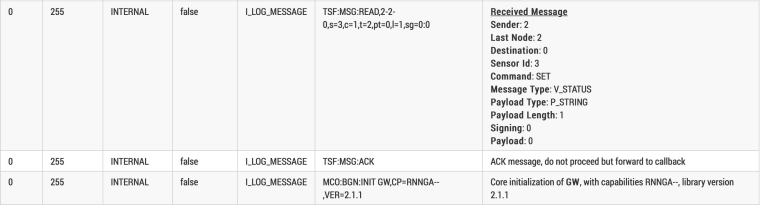
TSF:MSG:READ,2-2-0,s=3,c=1,t=2,pt=0,l=1,sg=0:0
TSF:MSG:ACK
MCO:BGN:INIT GW,CP=RNNGA--,VER=2.1.1
That translates to (using the log parser):
- Have you installed a capacitor between GND and VCC on your NRF? If so, what is the capacitance rating?
- Which version of the Arduino IDE are you using?
-
Setup Livolo branded RF433 switches with Arduino -
Ethernet gateway shows up on vera , but doens't want to include devices@hoggin I suggest that you step through the trouble-shooting steps below (in order):
- Ensure the Vera can see your gateway over USB, the most basic part of the connection - https://forum.mysensors.org/topic/5289/ui5-to-ui7-update/4
- Ensure that the right plugin files are installed on your vera - https://forum.mysensors.org/topic/5289/ui5-to-ui7-update/12
- If #1 and #2 checkout, then try the Serial Port troubleshooting section here - https://www.mysensors.org/controller/vera#configuring-the-vera-plugin-for-the-serialusb-gateway
-
Ethernet gateway shows up on vera , but doens't want to include devices@hoggin Do you have the following in your gateway sketch?
// Enable inclusion mode if your HA Controller supports it (e.g. Vera Controller) #define MY_INCLUSION_MODE_FEATURE // Enable Inclusion mode button on gateway #define MY_INCLUSION_BUTTON_FEATURE -
💬 Sensebender Micro@marceltrapman The author updated his repo within the past few days so you could open an issue on his GitHub repo to see if he can help...
-
💬 Sensebender Micro@tbowmo said in 💬 Sensebender Micro:
There is no kicad project available for the Sensebender Micro, I tried to convert it myself, but didn't succeed with it either.
I haven't tried this Eagle->KiCAD convertor myself but it might do the trick or at least reduce a lot of the manual labor to convert...
There's even a tutorial video.
-
US decora style wall switch@dbemowsk said in US decora style wall switch:
@blacey Thanks for the tip. Just installed it on my Fedora 23 box.
Excellent! Also, there is a pretty vibrant community behind FreeCAD so feel free to introduce yourself and ask questions on the FreeCAD forums - everyone is very helpful.