@Dreded thanks for the link. i wish it had a spot for an external antenna but i suppose it would be good enough to get it out of the way.
M
mvader
@mvader
Posts
-
NRF serial to usb for gateway? -
NRF serial to usb for gateway?@mfalkvidd @Nca78 I already have the Rpi 3 as a gateway, I also have a serial gateway (arduino) not in use.
my goal is/was to combine tasks. i have several intel nuc type PC's that have free resources. so i wanted to eliminate the uni-tasker and move it onto an existing pc.
at $9 cost is not a factor.
is the gateway code ARM only? or would it compile on x86?
if it's going to be a huge under taking, i won't mess with it. i have to many other projects at the moment.
i just didn't know if it would be an easy conversion. -
NRF serial to usb for gateway?currently i'm using an RPI3 for mysensor gateway, i would like to move the gateway off the pi and to a small linux pc that i have. but it has no gpio ports for the NRF module.
does anyone know if i could use something like this instead?
https://www.amazon.com/NOYITO-CH340T-Adapter-NRF24L01-Wireless/dp/B07DQBRBCM -
sendBatteryLevel not showing up in HA dasboard@peerv in my situation, if i click on any of my child devices, like temp, lux, humidity, etc. i can see the battery level. so i have to create a new sensor, in this case i'm creating computer_room_15_0, and i pull the value from child 1, i could pull it from 2,3 or 4, but i chose 1. and the value that i'm pulling is an attribute of child 1 called battery_level
now that i have created that sensor. i can place it where ever i want.
so the newly created sensor computer_room_15_0 is my entity_id that can go in a card or whatever.
before you do that, i would trouble shoot in the following way.- pick a child device and open it, ensure you can see the battery level.
- create a new sensor based on the template above (restart after)
- go into the the states dev tool page and ensure it's there and has the correct value.
- if yes, then open the standard states based screen see if it shows up at the top in the circle.
- if yes, put that entity in your lovelace ui as you see fit, if no, go back and figure out where it's not working.
you can also tail the log file and you restart and look for any error messages that may offer a clue to why.
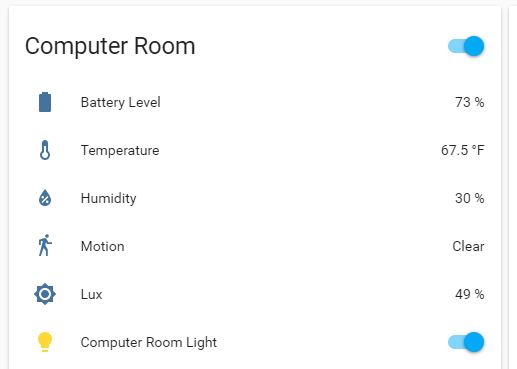
here is my states screen for the battery sensor.

-
sendBatteryLevel not showing up in HA dasboardthen under groups
computer_room_group:
name: Computer Room
entities:
- sensor.computer_room_15_0
- sensor.computer_room_15_1
- sensor.computer_room_15_2
- binary_sensor.computer_room_15_3
- sensor.computer_room_15_4 -
sendBatteryLevel not showing up in HA dasboard -
sendBatteryLevel not showing up in HA dasboard@peerv said in sendBatteryLevel not showing up in HA dasboard:
@mfalkvidd
Thanks, yes your solution could work. Also a voltage divider with a seperate child-id could work.But my point is that the Arduino battery_level value is already available in the mysensors.json in Home Assistant.
"type": 17,
        "sketch_name": "N60Breed",
        "sketch_version": "1.0",
        "battery_level": 91,
        "protocol_version": "2.3.1",
        "heartbeat": 0
I just don't know how to get the battery_level value presented in the HA UI.
you have to use a template.
under the sensors section- platform: template
sensors:
computer_room_15_0:
unit_of_measurement: "%"
entity_id: sensor.computer_room_15_1
icon_template: mdi:battery
value_template: >-
{%- if states.sensor.computer_room_15_1 != None -%}
{{states.sensor.computer_room_15_1.attributes.battery_level}}
{%- else -%}
0
{%- endif -%}
- platform: template
-
💬 Building a Raspberry Pi GatewayFYI looks like on the 2.3.1 beta the transport has been changed to rf24 instead of nrf24
-
queuing and sending messages@mvader said in queuing and sending messages:
I want to be able to issue commands (reboot, firmware update, etc) and when they wake up to transmit via motion or ti
can anyone point me in the right direction?
-
queuing and sending messagesI have several battery powered nodes. I want to be able to issue commands (reboot, firmware update, etc) and when they wake up to transmit via motion or timed sending of data. they receive and execute whatever command i have sent. so far i can't get this to work. if i send a reboot command from the controller during the OTA wait period. the node receives the request and reboots.. if the OTA period is over, then the node never follows the command. even after waking up. it still never executes said command.
so it seems the gateway is not queuing up the command or it's not sending when the node wakes up.what is the correct approach to implement this and how can i troubleshoot if the GW is receiving, queuing and sending commands for a sleeping node?
running lib 2.2.0
and the gw is 2.2.0 on a RPI3Thanks!
-
💬 Sensebender Micro@tbowmo said in 💬 Sensebender Micro:
Is it the default dualoptiboot bootloader? Then the bootloader itself does not support OTA FW. You need to put a sketch on it, that supports OTA. (Default sensebender micro sketches doesn't)
yes it's the default bootloader. yes i have OTA added to the sketch. it works if i reset the device via manual reset. but what i'd like to do is send the reboot command from myscontroller. but it seems to do nothing ever. does the bootloader support reboot? or is that something i also have to add to the sketch?
situation: i have about 15 sensors all over the house. if i update, i'd like to be able to assign the firmware, and then issue the reboot command. so upon reboot, they take the assigned firmware. what i don't want to do is have to go to each one and manually press the reset button to get it to take the firmware. i'm sure it's healthier to run up and down 3 flights of stairs. but i'm lazy :)
-
💬 Sensebender MicroAm I able to remote reboot the sensebender micro? I can send an OTA firmware if i manually press the reset button.
but can i use the reboot command in MYScontroller? it doesn't seem to do anything when issued. -
💬 NodeManager@user2684 said in 💬 NodeManager:
@mvader thanks for the feedback, I've added this issue on Github so to fix this in the next dev release https://github.com/mysensors/NodeManager/issues/344
Thanks!! here is the setup and loop part from the sketch
setup pinMode(7, OUTPUT); // “power pin” for Light Sensor digitalWrite(7, LOW); // switch power off loop digitalWrite(7, HIGH); // switch power on to LDR sendLight(forceTransmit); digitalWrite(7, LOW); // switch power off to LDR and the function /* * Sends Ambient Light Sensor information * * Parameters * - force : Forces transmission of a value */ void sendLight(bool force) // Get light level { if (force) lastLightLevel = -1; int rlightLevel = analogRead(LIGHT_PIN); int lightLevel = (analogRead(LIGHT_PIN) / 10.23) ; if (lightLevel != lastLightLevel) { gw.send(msgLight.set(lightLevel)); lastLightLevel = lightLevel; } -
💬 NodeManager@user2684 in the sensebender sketch we turn on digital pin 7 to provide power to the LDR to read it.
i have many sensors in my house and would rather not re-wire all of them.
how can i add this cleanly in nodemgr to make it work as before?
pinMode(7, OUTPUT); // “power pin” for Light Sensor
digitalWrite(7, LOW); // switch power offThanks!
-
💬 Building a Raspberry Pi Gateway@gohan said in 💬 Building a Raspberry Pi Gateway:
@masmat have you tried with ethernet gateway? If I have time I'll try the mqtt this weekend
@mvader I never noticed that.... is it the mqtt GW?
I'm not using mqtt.
for debug purposes i use MYSController
every 10 seconds on the dot. it shows me the version of the gateway.201 3/15/2018 20:47:15 RX 0 - Gateway INTERNAL C_INTERNAL NO I_VERSION 2.2.0 202 3/15/2018 20:47:25 RX 0 - Gateway INTERNAL C_INTERNAL NO I_VERSION 2.2.0 203 3/15/2018 20:47:35 RX 0 - Gateway INTERNAL C_INTERNAL NO I_VERSION 2.2.0 204 3/15/2018 20:47:45 RX 0 - Gateway INTERNAL C_INTERNAL NO I_VERSION 2.2.0 205 3/15/2018 20:47:55 RX 0 - Gateway INTERNAL C_INTERNAL NO I_VERSION 2.2.0 206 3/15/2018 20:48:05 RX 0 - Gateway INTERNAL C_INTERNAL NO I_VERSION 2.2.0@marceloaqno any ideas about that?
-
💬 Building a Raspberry Pi Gateway1st patch is still working good for me. have had no issues since applying it.
question. is it normal/correct for the gateway to ping or spam? every 10 seconds i see the gateway announce it's version.
its not doing the full restart or anything.. just giving the 2.2.0 every 10 seconds. -
💬 Building a Raspberry Pi Gateway@marceloaqno said in 💬 Building a Raspberry Pi Gateway:
@otto001 I'm trying to reproduce this problem, but so far I've got nothing beyond the normal behavior of mysgw.
I tried with a RPi1 and RPi3 using the fhem controller with the latest raspbian.My uptime is at 4 days now. so far still working with your patch. CPU is at 2% and sensor network still working correctly. will report if that changes.
-
💬 Building a Raspberry Pi Gateway@marceloaqno I am also recompiling and testing.
thanks for the (hopeful) fix
I will report back with my status in a few days -
💬 NodeManager@user2684 said in 💬 NodeManager:
@mvader for question #1, I've added it to the existing issue https://github.com/mysensors/NodeManager/issues/221. For question #2, for sensors using i2c the pin is not required despite within the code nodemanager will set a random pin (have a look at SensorSHT21 for example)
great.. thank you!
-
💬 NodeManager@user2684 can you add support for the Si7021 sensor as found in sensebender micro?
https://www.mysensors.org/hardware/microalso, 2nd question.
how do i register a sensor that is onboard?
you ask for a child id and pin that it's on. but if it's an onboard sensor. how do you make that work? just omit the pin?