Skip to content
  • MySensors
  • OpenHardware.io
  • Categories
  • Recent
  • Tags
  • Popular
Skins
  • Light
  • Brite
  • Cerulean
  • Cosmo
  • Flatly
  • Journal
  • Litera
  • Lumen
  • Lux
  • Materia
  • Minty
  • Morph
  • Pulse
  • Sandstone
  • Simplex
  • Sketchy
  • Spacelab
  • United
  • Yeti
  • Zephyr
  • Dark
  • Cyborg
  • Darkly
  • Quartz
  • Slate
  • Solar
  • Superhero
  • Vapor

  • Default (No Skin)
  • No Skin
Collapse
Brand Logo
  1. Home
  2. OpenHardware.io
  3. 💬 Insulated Whole House Fan

💬 Insulated Whole House Fan

Scheduled Pinned Locked Moved OpenHardware.io
mysensorswhole house fan
72 Posts 11 Posters 13.4k Views 11 Watching
  • Oldest to Newest
  • Newest to Oldest
  • Most Votes
Reply
  • Reply as topic
Log in to reply
This topic has been deleted. Only users with topic management privileges can see it.
  • L lis610

    Replaced NRF24L01+ and it is working now.
    Having trouble with DHT22 it is working on MEGA, but not on Pro Mini ATMega328P 3.3V 8MHz any suggestions

    petewillP Offline
    petewillP Offline
    petewill
    Admin
    wrote on last edited by
    #57

    @lis610 Great news! I echo what @hard-shovel said. I try to supply my 5v sensors with 5v power from a regulator (with the appropriate capacitors) instead of my Arduino.

    My "How To" home automation video channel: https://www.youtube.com/channel/UCq_Evyh5PQALx4m4CQuxqkA

    1 Reply Last reply
    0
    • L Offline
      L Offline
      lis610
      wrote on last edited by
      #58

      I am using 5V power supply and testing sensor with DHT example. DHT is working with MEGA power by 3.3 or 5 v. Maybe it is not working because of Pro Mini 8MHz?

      petewillP chisightC 2 Replies Last reply
      0
      • L lis610

        I am using 5V power supply and testing sensor with DHT example. DHT is working with MEGA power by 3.3 or 5 v. Maybe it is not working because of Pro Mini 8MHz?

        petewillP Offline
        petewillP Offline
        petewill
        Admin
        wrote on last edited by
        #59

        @lis610 It should work at 8MHz. Have you double checked the wiring? Did you try with the default sketch in the DHT library? What are the debug messages saying?

        My "How To" home automation video channel: https://www.youtube.com/channel/UCq_Evyh5PQALx4m4CQuxqkA

        1 Reply Last reply
        0
        • L lis610

          I am using 5V power supply and testing sensor with DHT example. DHT is working with MEGA power by 3.3 or 5 v. Maybe it is not working because of Pro Mini 8MHz?

          chisightC Offline
          chisightC Offline
          chisight
          wrote on last edited by
          #60

          @lis610 DHT22 being a "one wire" protocol, are timing dependent. Make sure that you have defined #define F_CPU 8000000L or have selected the 8mhz option in the newer versions of the IDE. If #define F_CPU gives you an error, you have to do it in the IDE.
          Are you using the Adafruit DHT library? Which version? To double check that your CPU frequency is correct, create a new sketch with the following:

          void setup() {
            pinMode(13, OUTPUT);
          }
          
          void loop() {
            digitalWrite(13,HIGH);
            delay(10000);
            digitalWrite(13,LOW);
            delay(10000);
          }
          

          Then time the speed of the blinks. it should be 10 seconds on and 10 seconds off. if you're getting 20 seconds on and 20 seconds off, your F_CPU is wrong.

          See me on IRC at ircs://freenode:6697/##nodered and ircs://freenode:6697/#mysensors

          1 Reply Last reply
          0
          • L Offline
            L Offline
            lis610
            wrote on last edited by
            #61

            Thank you, guys.
            Got the DHT working! Next step connect motor and fan, fingers crossed :)

            chisightC 1 Reply Last reply
            0
            • L lis610

              Thank you, guys.
              Got the DHT working! Next step connect motor and fan, fingers crossed :)

              chisightC Offline
              chisightC Offline
              chisight
              wrote on last edited by
              #62

              @lis610 you can't just leave us hanging and say "it's working", tell us what the problem was. Was it wiring, was it the 8mhz, was it a wrong library setting, was it a bad sensor? What did you do to make it work? The next person will want to know because they could have the same issue and it teaches the rest of us which troubleshooting tips are working.

              See me on IRC at ircs://freenode:6697/##nodered and ircs://freenode:6697/#mysensors

              1 Reply Last reply
              0
              • L Offline
                L Offline
                lis610
                wrote on last edited by
                #63

                In the beginning, I connected the DHT sensor to Pro Mini A0 and separate power supply (5V) and ran DHT Example sketch and eading was "nan". Want to mention that all other wires (FAN setup ) attached to Pro Mini as well. Then I disconnect Pro Mini from setup and connect DHT to it (GND, VCC, and A0) got numbers by running DHT Example. Connect everything together (motor, display, radio) and connect DHT to Pro Mini (GND, VCC, and A0) turn on and got zeros for Temp and Hum. Got frustrated and left for a walk. When I come back, Temp: 85 and Hum 52. I was not patient enough. It takes 5 to 6 min for Temp to show on display. I also tried to connect DHT VCC to the external power supply 3.3 and 5 V, but leave GND connected to Pro Mini and it works.

                1 Reply Last reply
                0
                • L Offline
                  L Offline
                  lis610
                  wrote on last edited by
                  #64

                  Finish! Thank you for all your help!

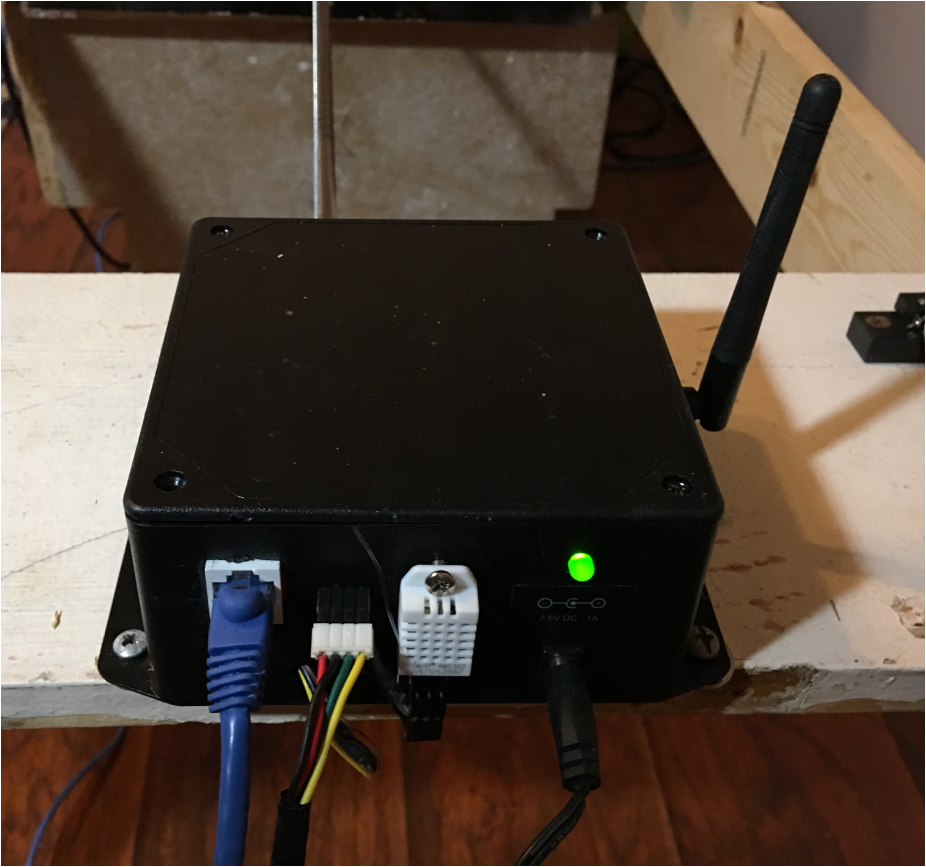
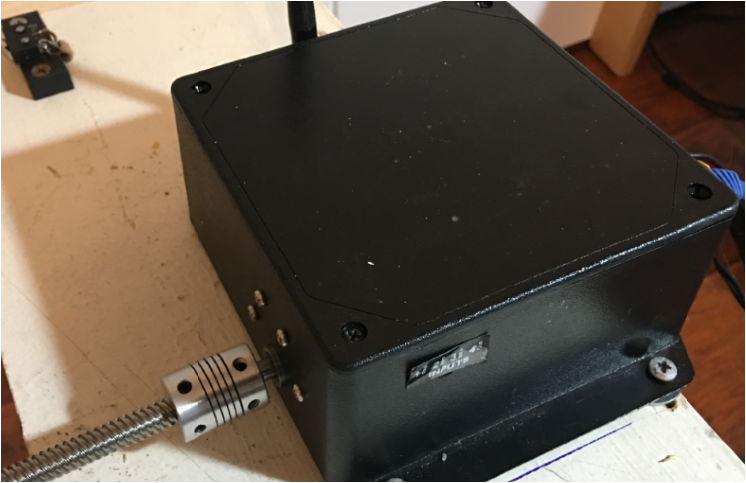
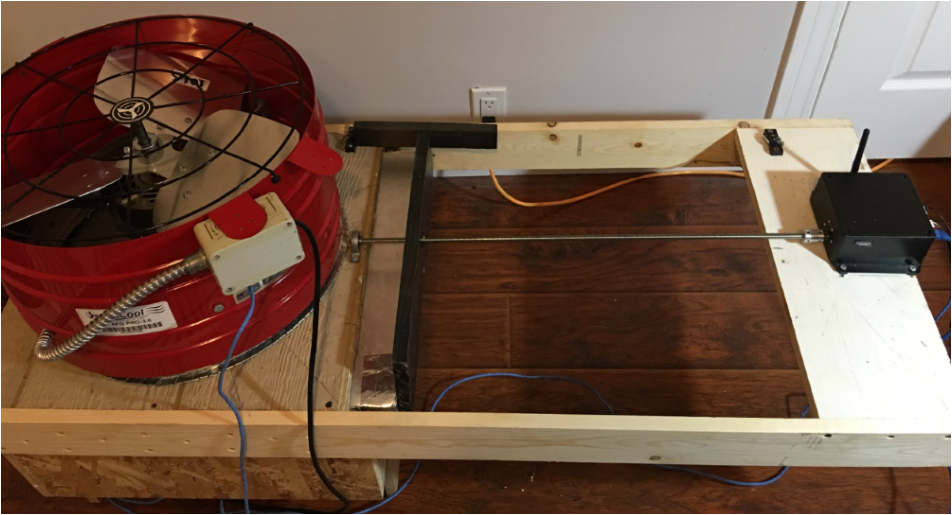
                  0_1533177411968_91c3b0fa-87ff-4514-811c-ffa101bbad98-image.png ![alt text](image url)
                  0_1533177453426_38d363a5-596c-4626-82d1-b4e6de2260c7-image.png
                  0_1533177489450_910be9d8-b98d-465c-98eb-7bed5d71b63e-image.png

                  petewillP 1 Reply Last reply
                  1
                  • L lis610

                    Finish! Thank you for all your help!

                    0_1533177411968_91c3b0fa-87ff-4514-811c-ffa101bbad98-image.png ![alt text](image url)
                    0_1533177453426_38d363a5-596c-4626-82d1-b4e6de2260c7-image.png
                    0_1533177489450_910be9d8-b98d-465c-98eb-7bed5d71b63e-image.png

                    petewillP Offline
                    petewillP Offline
                    petewill
                    Admin
                    wrote on last edited by
                    #65

                    @lis610 Awesome! Congratulations and great job for not giving up. That was a lot to tackle for a first project! Nice enclosure to house everything. Looks way cleaner than mine :)

                    My "How To" home automation video channel: https://www.youtube.com/channel/UCq_Evyh5PQALx4m4CQuxqkA

                    1 Reply Last reply
                    0
                    • L Offline
                      L Offline
                      lis610
                      wrote on last edited by
                      #66

                      Can you add additional code; Close the cover if Fan does not start and display error that fan has no power. Thank you.

                      1 Reply Last reply
                      0
                      • L Offline
                        L Offline
                        lis610
                        wrote on last edited by
                        #67

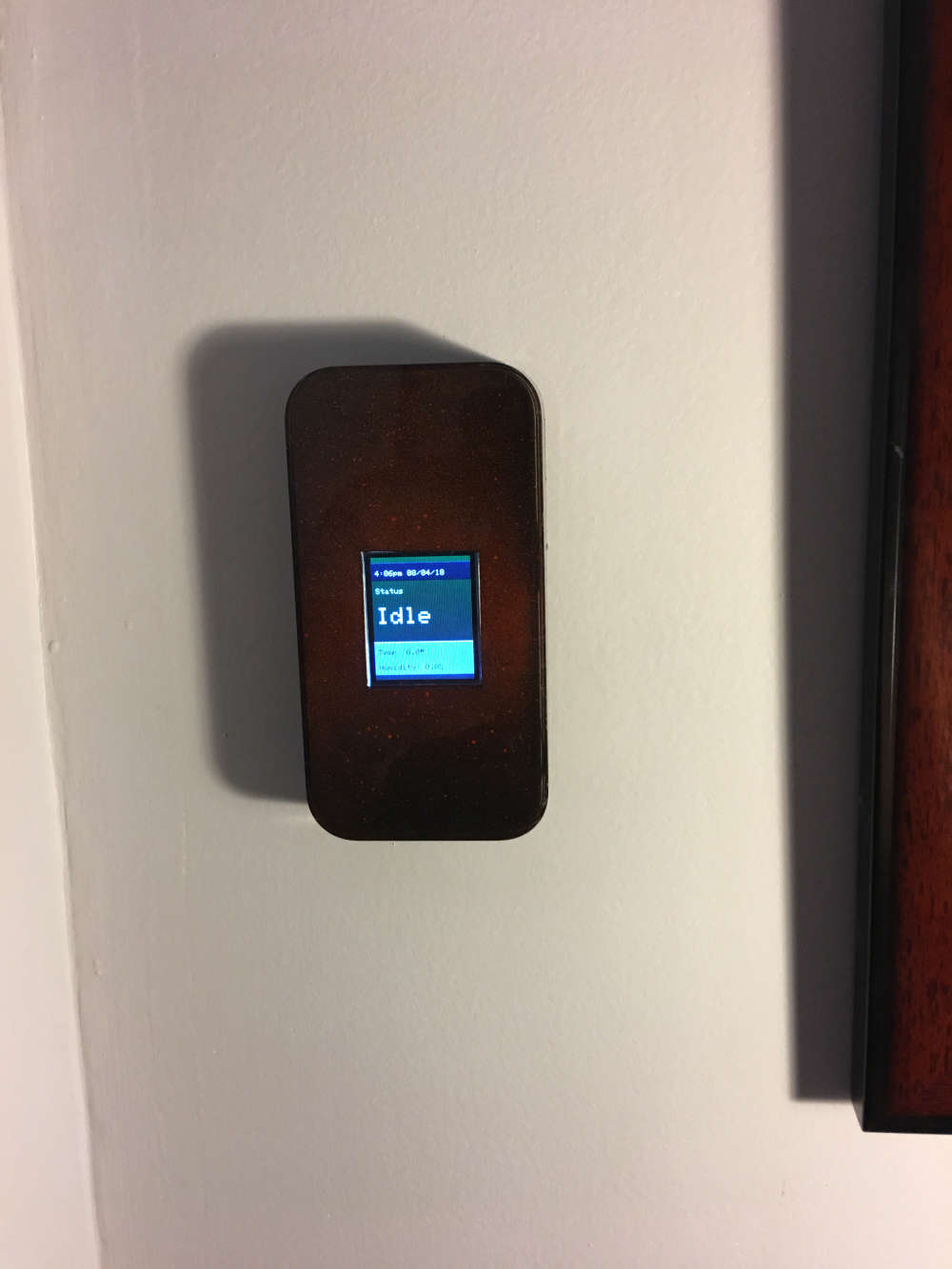
                        Display. I used old case from iPod. Sprayed a little red paint and top it with black. Push button at the bottom of the case.0_1533511027712_IMG_4216.JPG

                        chisightC 1 Reply Last reply
                        1
                        • L lis610

                          Display. I used old case from iPod. Sprayed a little red paint and top it with black. Push button at the bottom of the case.0_1533511027712_IMG_4216.JPG

                          chisightC Offline
                          chisightC Offline
                          chisight
                          wrote on last edited by
                          #68

                          Looks great @lis610 !

                          See me on IRC at ircs://freenode:6697/##nodered and ircs://freenode:6697/#mysensors

                          1 Reply Last reply
                          0
                          • L Offline
                            L Offline
                            lis610
                            wrote on last edited by
                            #69

                            I am using RCWL-0516 Microwave Radar Sensor for on/off the display. This sensor is very sensitive. I just want to activate the display in a close range. Any suggestions?

                            chisightC T H 3 Replies Last reply
                            0
                            • L lis610

                              I am using RCWL-0516 Microwave Radar Sensor for on/off the display. This sensor is very sensitive. I just want to activate the display in a close range. Any suggestions?

                              chisightC Offline
                              chisightC Offline
                              chisight
                              wrote on last edited by
                              #70

                              @lis610 said in 💬 Insulated Whole House Fan:

                              RCWL-0516

                              https://www.rogerclark.net/investigating-a-rcwl-9196-rcwl-0516-radar-motion-detector-modules/ shows some possible ways to read something other than a digital output of motion at 5 to 7 meters.

                              It doesn't look like there is a simple way to just make it less sensitive.

                              See me on IRC at ircs://freenode:6697/##nodered and ircs://freenode:6697/#mysensors

                              1 Reply Last reply
                              0
                              • L lis610

                                I am using RCWL-0516 Microwave Radar Sensor for on/off the display. This sensor is very sensitive. I just want to activate the display in a close range. Any suggestions?

                                T Offline
                                T Offline
                                tsjoender
                                wrote on last edited by
                                #71

                                @lis610 said in 💬 Insulated Whole House Fan:

                                I am using RCWL-0516 Microwave Radar Sensor for on/off the display. This sensor is very sensitive. I just want to activate the display in a close range. Any suggestions?

                                You could try the XYC-WB-DC radar sensor. This one allows the sensitivity to be adjusted by changing a resitor value. Here's a Youtube video about it:

                                https://www.youtube.com/watch?v=41rf6NbuhBs

                                I'm waiting for mine to come in from China, so no first hand experience yet on how these sensors work.

                                1 Reply Last reply
                                0
                                • L lis610

                                  I am using RCWL-0516 Microwave Radar Sensor for on/off the display. This sensor is very sensitive. I just want to activate the display in a close range. Any suggestions?

                                  H Offline
                                  H Offline
                                  hard-shovel
                                  wrote on last edited by hard-shovel
                                  #72

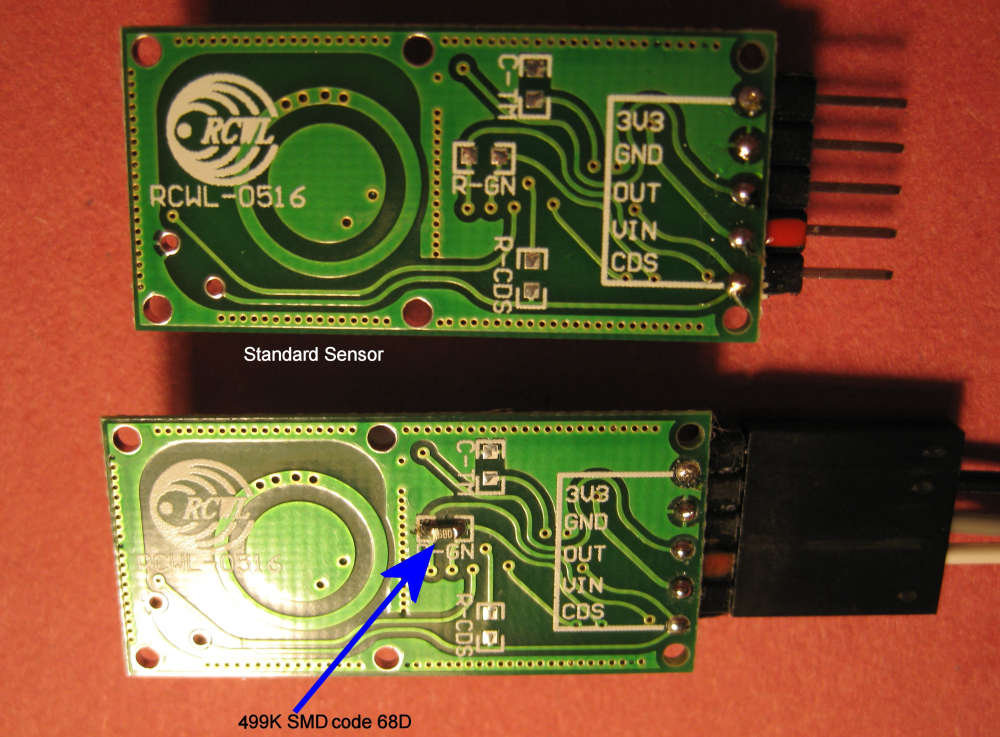
                                  @lis610 I have found with a 499K resistor the range is reduced to about 1.2m in a ABS box.
                                  With a 1Mohm it was about 3m, I do not have many high value SMD resistors to experiment with but the lower the value the lower the range.
                                  0_1533564303458_Img_4277x.jpg

                                  Just tried with a 333K and it operates about 0.8m in free air.
                                  1 Reply Last reply
                                  0
                                  Reply
                                  • Reply as topic
                                  Log in to reply
                                  • Oldest to Newest
                                  • Newest to Oldest
                                  • Most Votes


                                  19

                                  Online

                                  11.7k

                                  Users

                                  11.2k

                                  Topics

                                  113.1k

                                  Posts


                                  Copyright 2025 TBD   |   Forum Guidelines   |   Privacy Policy   |   Terms of Service
                                  • Login

                                  • Don't have an account? Register

                                  • Login or register to search.
                                  • First post
                                    Last post
                                  0
                                  • MySensors
                                  • OpenHardware.io
                                  • Categories
                                  • Recent
                                  • Tags
                                  • Popular