Skip to content
  • MySensors
  • OpenHardware.io
  • Categories
  • Recent
  • Tags
  • Popular
Skins
  • Light
  • Brite
  • Cerulean
  • Cosmo
  • Flatly
  • Journal
  • Litera
  • Lumen
  • Lux
  • Materia
  • Minty
  • Morph
  • Pulse
  • Sandstone
  • Simplex
  • Sketchy
  • Spacelab
  • United
  • Yeti
  • Zephyr
  • Dark
  • Cyborg
  • Darkly
  • Quartz
  • Slate
  • Solar
  • Superhero
  • Vapor

  • Default (No Skin)
  • No Skin
Collapse
Brand Logo
korttomaK

korttoma

@korttoma
Hero Member
About
Posts
688
Topics
13
Shares
0
Groups
1
Followers
3
Following
0

Posts

Recent Best Controversial

  • 💬 Dimmable LED Actuator
    korttomaK korttoma

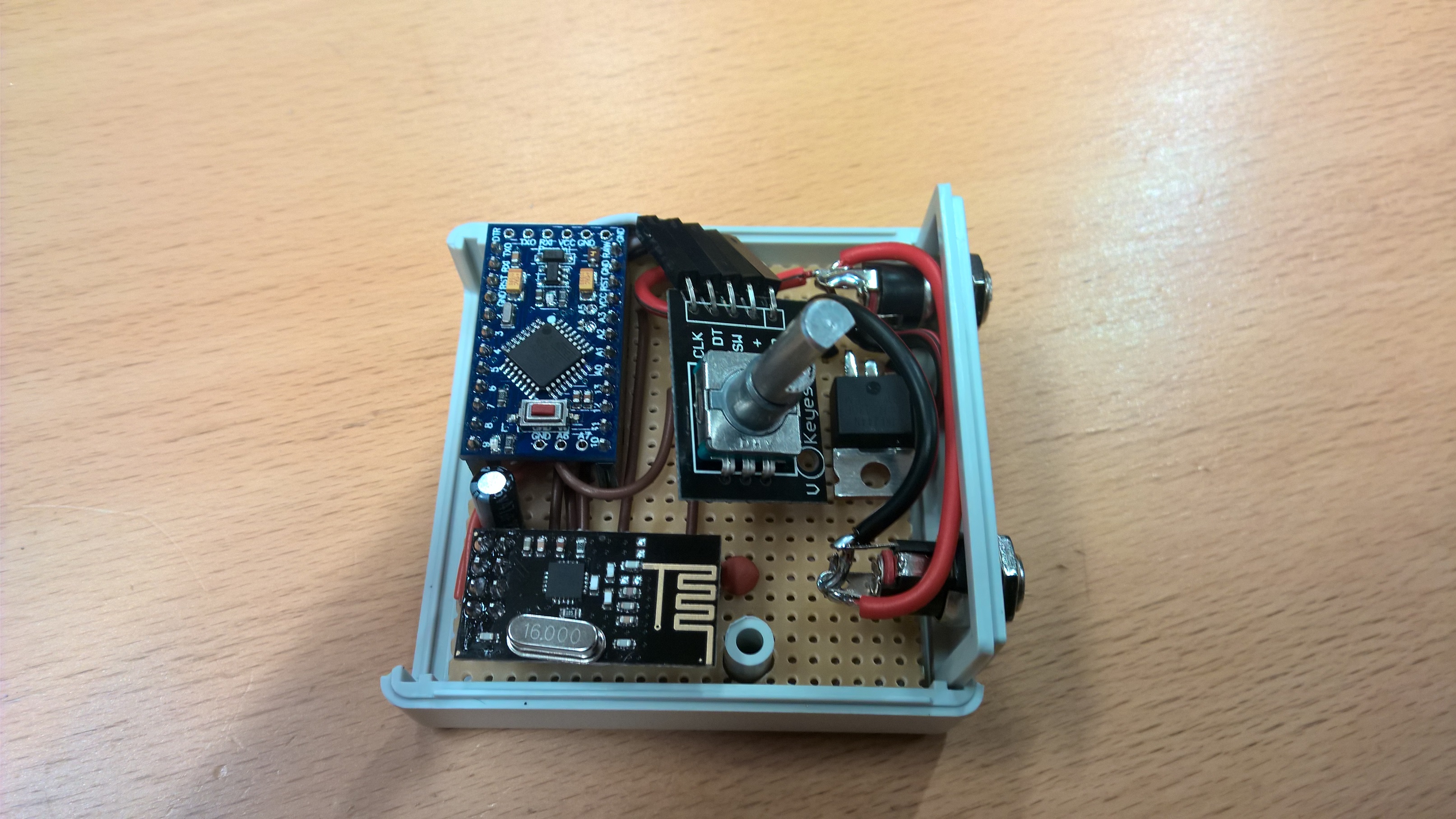
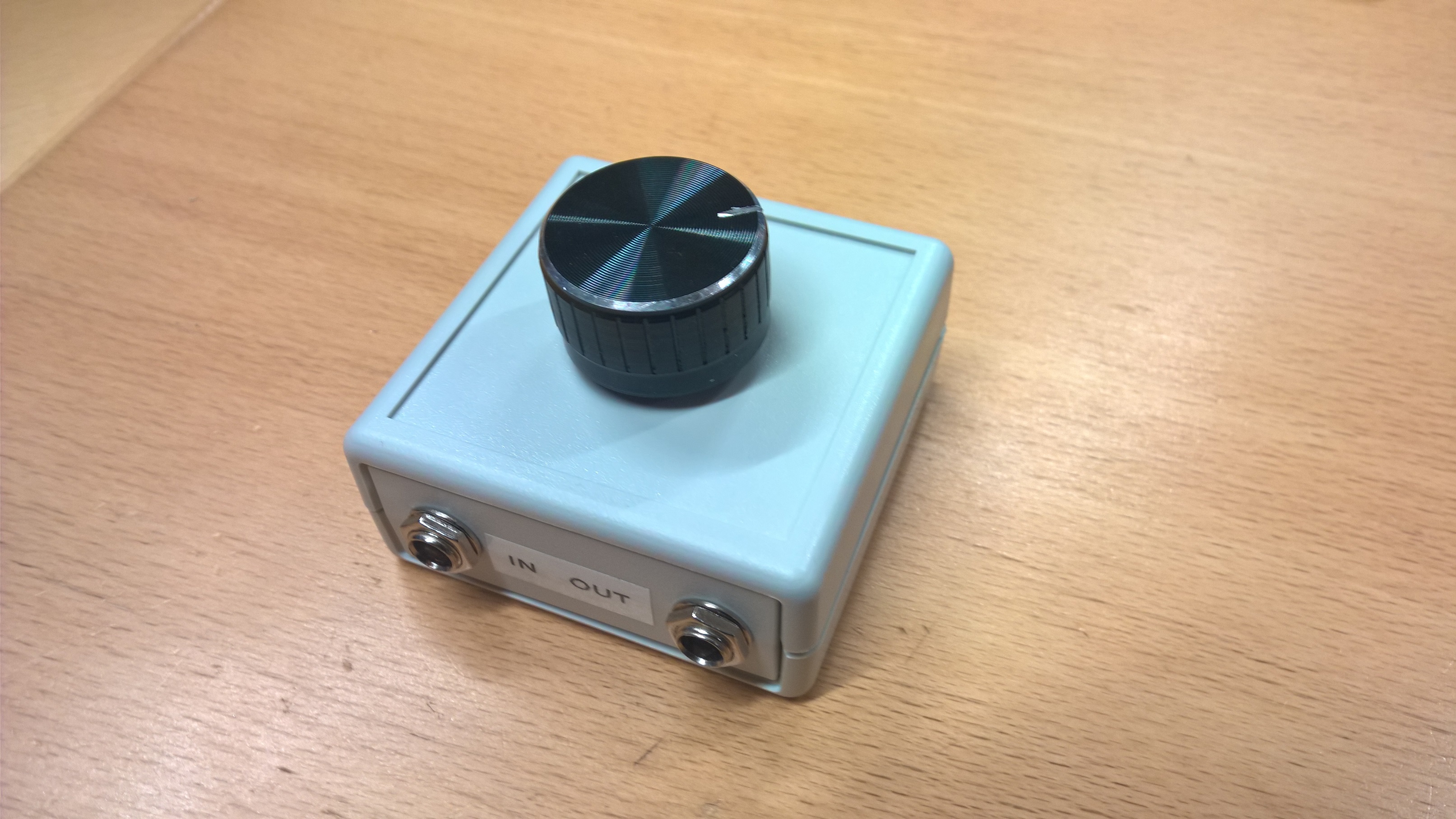
    Inspirational pictures from my Dimmable LED Actuator with rotary encoder device I made for my sons bedside lamp.
    Running this at 12VDC. His lamp had a G9 socket so I just broke apart the G9 LED bulb and soldered some G4 12VDC LED lights like these to it and replaces the "Dumb" switch with a 5mm DC plug. It turned out so nice that I think I will MySensor my own bedside lamp also.

    Edit: btw, I found the nice big knobs from here -> eBay

    0_1476680417320_WP_20161014_07_07_53.jpg

    0_1476680429390_WP_20161014_07_11_47.jpg

    Announcements

  • MySensored 230v motion sensor with light level
    korttomaK korttoma

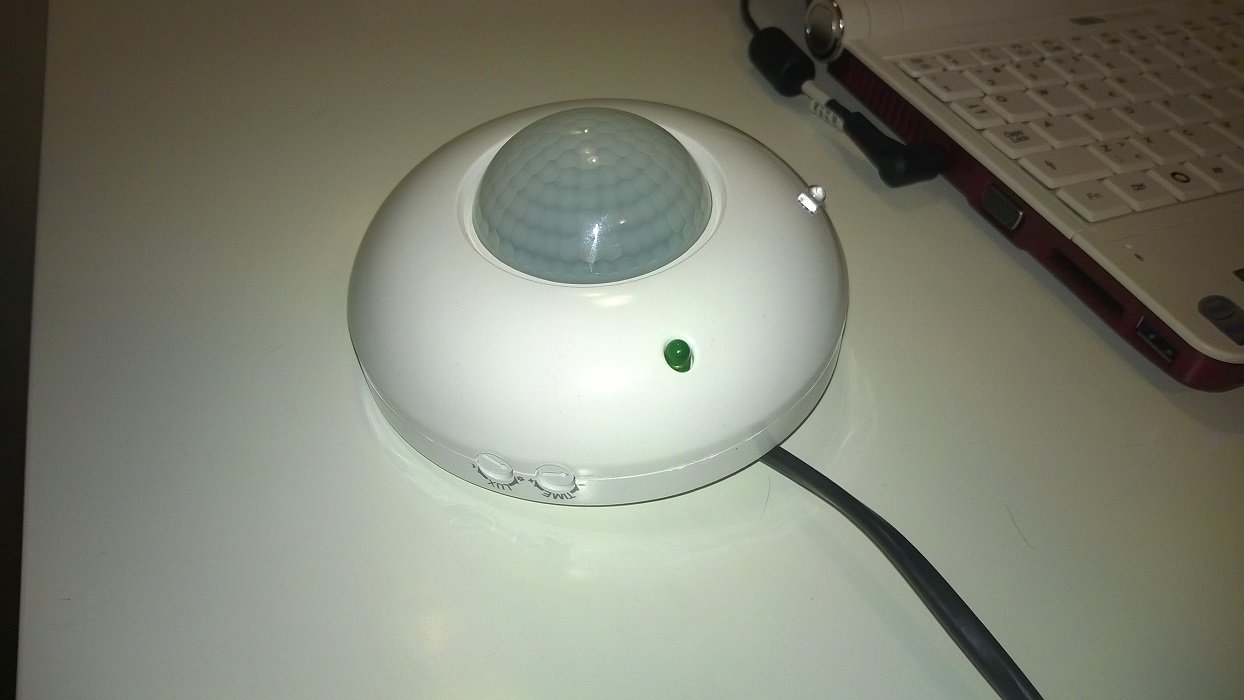
    I have been searching for a nice enclosure to use with some motion sensors but nothing was to my satisfactory. So I started to look at different motion sensors to see if I could find something I could modify. I found this one at my local electronics shop. Both looks and prize was right so I picked one up.

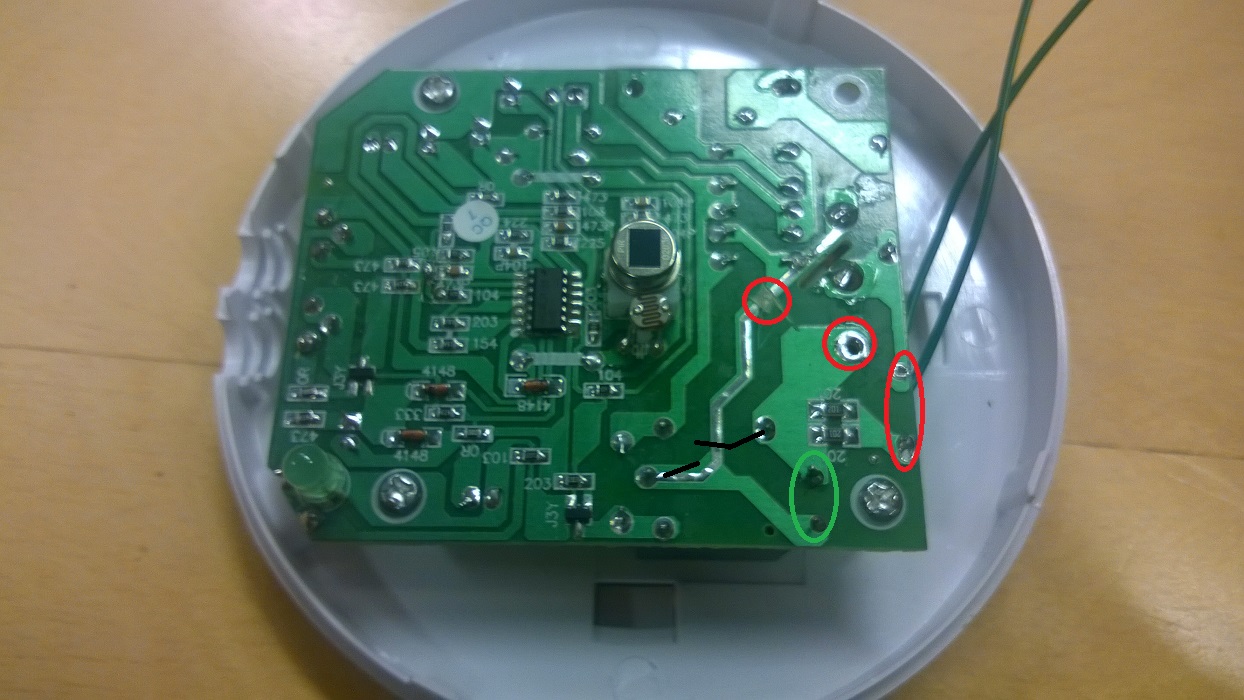
    I cut the Live copper strip to the relay and removed the wire that would normally go to the lamp and removed 2 capacitors (marked with red and green), soldered 2 wires to were a capacitor had been to access the relay contacts (marked with green).
    WP_20141126_001.jpg

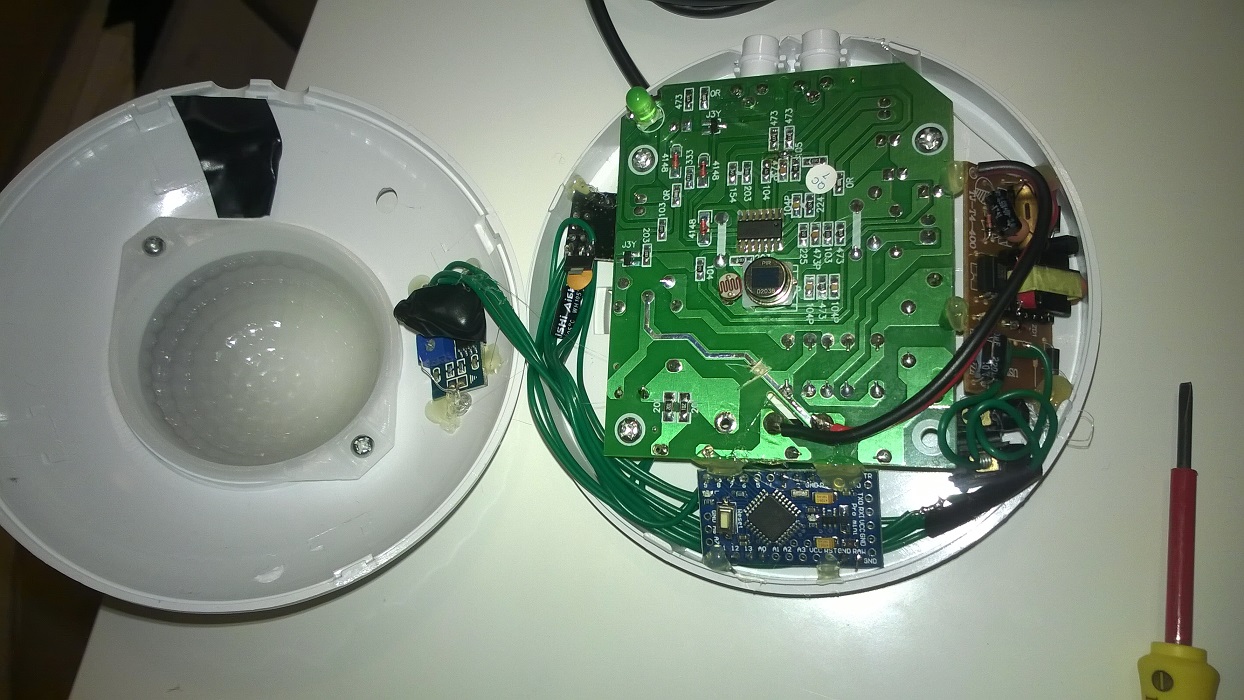
    Destroid one of them 90 cent iPhone charger clones to get a 5v power supply added a Pro Mini with radio and a LM393 photo resistor.
    Connected the relay contacts to GND and a binary in on the arduino and the photo transistor to a analog in.
    WP_20141126_003.jpg

    Here is the result:
    WP_20141126_006.jpg

    And here is the sketch:
    https://codebender.cc/sketch:62574

    Have not attached it to the ceiling yet just had it on the floor for testing, motion sensor works great but I'm not sure if the light sensor will be sensitive enough.

    Think I'm going to add a 2A glas fuse to it because of the cheep 5v power just in case.

    My Project

  • Temperature sensor accuracy comparison
    korttomaK korttoma

    @wes Thanks for the list of sensor accuracy. But for for example battery nodes there are other parameters that are at least as important as temp accuracy and you left out the Si7021 that is really good for battery driven nodes.

    Si7021
    Precision Relative Humidity Sensor ± 3% RH (max), 0–80% RH
    High Accuracy Temperature Sensor ±0.4 °C (max), –10 to 85 °C
    Wide operating voltage (1.9 to 3.6 V)
    Low Power Consumption 150 µA active current 60 nA standby current

    Hardware

  • First run of new nodeMCU based GatewaySerial. Not sure what it is saying.
    korttomaK korttoma

    The correct way to use any ESP8266 based boards with the current MySensors implementation is to configure them as WiFi Gateways with local sensors. You cannot make one ESP8266 an serial GW and expect all other ESPs to communicate via this one using the WiFi.

    I other words all your ESPs will be Gateways but without any transport (NRF24L01 or RFM69 that is currently supported).

    Troubleshooting

  • nRF5 action!
    korttomaK korttoma

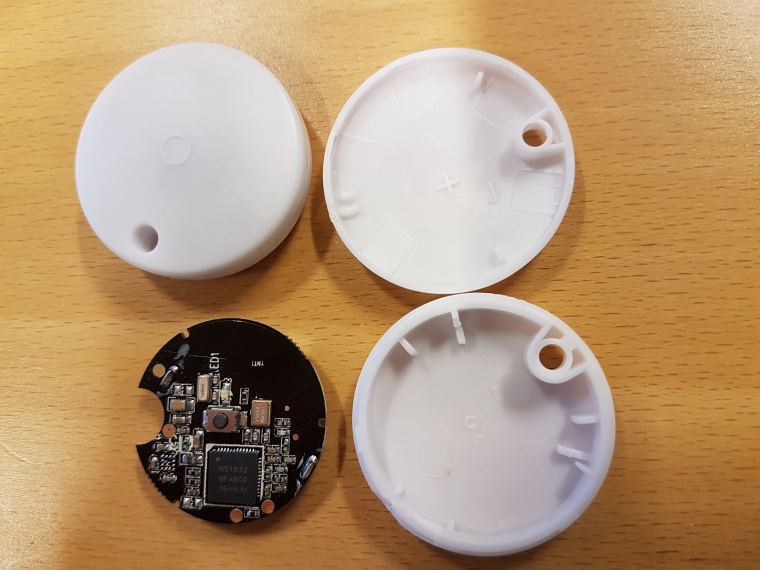
    @nca78 I have now measured the current consumption of the small bluetooth beacon device (N51822 QFABC0) using your code and the results are encouraging.

    With your code I get around 4uA sleep current compared to 800-4000uA with my old code :D

    Measurements done with an Micro (nano) ampere meter (double) that has not been calibrated against a reliable meter so do not take the measured values so seriously but more as a comparison.

    Device

    My Project

  • 💬 Building a WiFi Gateway using ESP8266
    korttomaK korttoma

    @sghazagh maybe you can take a picture of the setup. Maybe someone else can see something that you don't.

    Announcements

  • Relay with button
    korttomaK korttoma

    @Lanman said:

    doesn't seem to work

    Can you elaborate on this? What is it that is not working? Can you get the serial debug output from your node?

    // Enable debug prints
    #define MY_DEBUG
    
    Troubleshooting

  • Alternative battery operated motion sensor using 433MHz sensors
    korttomaK korttoma

    I never managed to get a motion sensor attached to an arduino to work reliably, especially on batteries so I looked for an alternative using ready made sensor that could be "MySensord". Here is what I came up with:

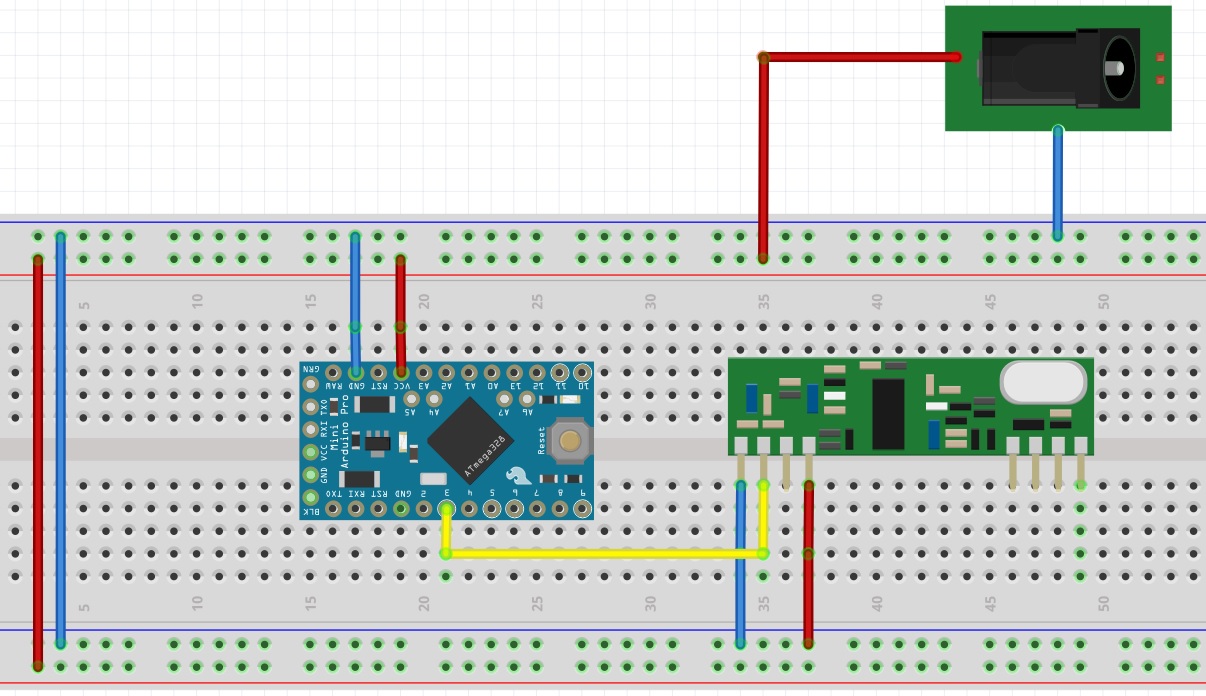
    I found these 433MHz battery operated Motion sensors that seemed like a nice alternative and then I got myself this 433MHz receiver to hock up to my MySensors 5V Pro Mini node like this (I allso connected an NRF24L01+ but I left it out from the drawing to keep it clean):

    0_1479892250747_433MHzReceiver.jpg

    I attached a 17,3cm wire as a quarter length antenna to the receiver calculated here

    Then I created this sketch to handle it all:

    /**
     * The MySensors Arduino library handles the wireless radio link and protocol
     * between your home built sensors/actuators and HA controller of choice.
     * The sensors forms a self healing radio network with optional repeaters. Each
     * repeater and gateway builds a routing tables in EEPROM which keeps track of the
     * network topology allowing messages to be routed to nodes.
     *
     * Created by Henrik Ekblad <henrik.ekblad@mysensors.org>
     * Copyright (C) 2013-2015 Sensnology AB
     * Full contributor list: https://github.com/mysensors/Arduino/graphs/contributors
     *
     * Documentation: http://www.mysensors.org
     * Support Forum: http://forum.mysensors.org
     *
     * This program is free software; you can redistribute it and/or
     * modify it under the terms of the GNU General Public License
     * version 2 as published by the Free Software Foundation.
     *
     *******************************
     *
     *
     *
     *
     */
    
    // Enable debug prints
    //#define MY_DEBUG
    
    // Enable and select radio type attached
    #define MY_RADIO_NRF24
    //#define MY_RADIO_RFM69
    #define MY_BAUD_RATE  9600
    
    #define MY_NODE_ID 18
    #define SKETCH_NAME "RF433 Motion"
    #define SKETCH_VERSION "1.0"
    
    #include <MySensors.h>
    #include <RCSwitch.h>
    #include <SPI.h>
    
    unsigned long TRIP_RESET_TIME = 120000;
    
    unsigned long NOW_TIME = millis();
    unsigned long KnownSensor1 = 5945054;
    unsigned long TRIP_TIME_1 = millis();
    bool untripsent_1 = 1;
    bool tripped_1 = 0;
    
    unsigned long KnownSensor2 = 5914846;
    unsigned long TRIP_TIME_2 = millis();
    bool untripsent_2 = 1;
    bool tripped_2 = 0;
    
    #define RF433RECIEVER 3   // The digital input you attached your motion sensor.  (Only 2 and 3 generates interrupt!)
    
    RCSwitch mySwitch = RCSwitch();
    
    #define CHILD_ID_1 1   // Id of the sensor child
    #define CHILD_ID_2 2   // Id of the sensor child
    
    // Initialize motion message
    MyMessage msg1(CHILD_ID_1, V_TRIPPED);
    MyMessage msg2(CHILD_ID_2, V_TRIPPED);
    
    void setup()
    {
      mySwitch.enableReceive(digitalPinToInterrupt(RF433RECIEVER));  // Receiver on interrupt 0 => that is pin #2
    
    }
    
    void presentation()  {
      // Send the sketch version information to the gateway and Controller
      sendSketchInfo(SKETCH_NAME, SKETCH_VERSION);
    
      wait(50);
      // Register all sensors to gw (they will be created as child devices)
      present(CHILD_ID_1, S_MOTION);
      wait(50);
      present(CHILD_ID_2, S_MOTION);
      wait(50);
    
    }
    
    void loop()
    {
    
    
      if (mySwitch.available()) {
    
        int value = mySwitch.getReceivedValue();
    
        if (value == 0) {
          Serial.print("Unknown encoding");
        } else {
          Serial.print("Received ");
          Serial.println( mySwitch.getReceivedValue() );
          //Serial.print(" / ");
          //Serial.print( mySwitch.getReceivedBitlength() );
          //Serial.print("bit ");
          //Serial.println( mySwitch.getReceivedProtocol() );
    
          if (mySwitch.getReceivedValue() == KnownSensor1) {
            int value = mySwitch.getReceivedValue();
    
            if (tripped_1 == 0) {
              Serial.println("Sending Tripped value");
              send(msg1.set(1));  // Send tripped value to gw
              tripped_1 = 1;
            }
    
            TRIP_TIME_1 = millis();
            untripsent_1 = 0;    
          }
    
          if (mySwitch.getReceivedValue() == KnownSensor2) {
            int value = mySwitch.getReceivedValue();
    
            if (tripped_2 == 0) {
              Serial.println("Sending Tripped value");
              send(msg2.set(1));  // Send tripped value to gw
              tripped_2 = 1;
            }
    
            TRIP_TIME_2 = millis();
            untripsent_2 = 0;        
          }
    
          mySwitch.resetAvailable();
        }
    
      }
      
      unsigned long NOW_TIME = millis();
      
      if ((NOW_TIME - TRIP_TIME_1 >= TRIP_RESET_TIME) && (untripsent_1 == 0))
      {
        Serial.println("Sending Un-tripped value");
        send(msg1.set(0));  // Send Un-tripped value to gw
        TRIP_TIME_1 = NOW_TIME;
        untripsent_1 = 1;
        tripped_1 = 0;
      }
    
      if ((NOW_TIME - TRIP_TIME_2 >= TRIP_RESET_TIME) && (untripsent_2 == 0))
      {
        Serial.println("Sending Un-tripped value");
        send(msg2.set(0));  // Send Un-tripped value to gw
        TRIP_TIME_2 = NOW_TIME;
        untripsent_2 = 1;
        tripped_2 = 0;    
      }
      
    }


    So far I'm happy with the performance. I have one outside sending me a snapshot from a camera if there is movement when we are away and I have not had any false triggers so far. The communication range of the 433MHz sensors is great. I cannot comment on how long the batteries will hold on these since they have only been in use a few weeks.

    My Project

  • Request: New Sensor Type ? Thermostatically controlled switch
    korttomaK korttoma

    I finally put together a thermostat device sketch. Unfortunately it got a bit out of hand and I implemented lots of features that most people probably not need.

    Not sure if I'm using the V_HVAC_FLOW_STATE and V_HVAC_SETPOINT_HEAT correctly but it seems to work with my Vera UI5 presented as a S_HEATER device.

    Here is the sketch in case someone needs it.

    https://codebender.cc/sketch:169733

    Feature Requests

  • 💬 Easy/Newbie PCB for MySensors
    korttomaK korttoma

    @maghac it is not just as simple as the capacitor size is added, true it is added but different size capacitors also filter disturbances at different frequencies. So adding different size capacitors in parallel can act as a more effective disturbance filter.

    OpenHardware.io mysensors battery easy newbie pcb mysx

  • Relay with button
    korttomaK korttoma

    @Lanman said:

    Multiple libraries were found for "MySensors.h"
    Used: D:\Data\Documents\Arduino\libraries\MySensors
    Not used: C:\Program Files (x86)\Arduino\libraries\MySensors-master

    Looks like you just have some issues with your libraries.

    Seems like you have 2 instances of the MySensors library installed in 2 different locations. Maybe you should delete or move the one you are not using to another location.

    Also the Bounce2 library is not included in the MySensors 2.0 library so you need to install it separately if it is missing.
    You can collect the Bounce2 library from this collection -> https://github.com/mysensors/MySensorsArduinoExamples

    Troubleshooting

  • nRF5 action!
    korttomaK korttoma

    Just received these tiny NRF51822 devices and would like to turn them in to MySensors 1 button scencontroller.
    Where should I start?

    1. I guess I will need some kind of USB adapter ti program them. Think I read somewhere about JLink. Would this do?

    0_1515562170867_20180110_071948.jpg

    My Project

  • Ethernet gateaway with wemos D1 (ESP8266)
    korttomaK korttoma

    It should be possible to create a WiFi ESP8266 Gateway using the WeMos D1.

    Start from here -> https://www.mysensors.org/build/esp8266_gateway

    Seems like the pinout of the NodeMCU is similar to the WeMos but to be sure you could check from here -> https://www.wemos.cc/product/d1-mini-pro.html

    Hope this helps

    Feature Requests ethernetgateway

  • Scene Controller
    korttomaK korttoma

    @naveen said:

    @korttoma , what's yours like??

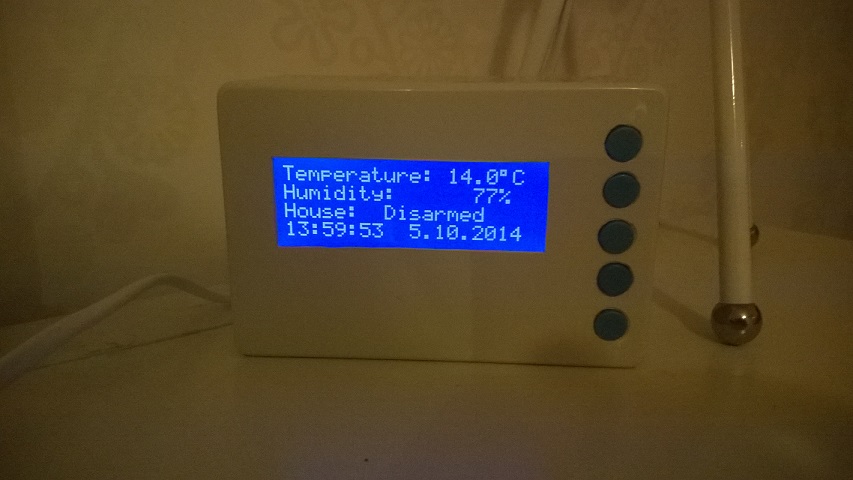
    WP_20141005_005.jpg

    The picture is a little dark but you get the idea. White box with blue buttons.

    Development

  • Only ethernet nodes?
    korttomaK korttoma

    You can connect sensors directly to the Gateway and you can connect several Gateways to your Controller ( You need to check if Domoticz can handle this ).

    So what you will have is several of these:
    Sensor <-> GatewayNode <--wired--> Controller

    General Discussion

  • "Last update" node field in Vera interface
    korttomaK korttoma

    @hek tested to replace '%H:%M' with '%c' and it gave a quite nice result:

    0_1485157093862_procent_c.jpg

    Vera

  • Newbie Problem! Get Started with NRF24L01+
    korttomaK korttoma

    Don't use 0 for your node ID! (gw.begin(NULL, 0);) Choose a value beween 1 and 254.

    nodeId - The unique id (1-254) for this sensor.
    

    Do not confuse this with child sensor ID

    childSensorId - The unique child id you want to choose for the sensor connected to this Arduino. Range 0-254.
    
    Development

  • 2.0 gateway with 1.5 sensors [SOLVED]
    korttomaK korttoma

    Yes, you need to first update the gateway to 2.0. Most 1.5.4 sensors should work with 2.0 Gateway. But 2.0 Sensors will not work with old Gateway. I had no issues with my sensors during the couple of weeks I updated them. There might of course be exceptions to this.

    General Discussion

  • 2 or more DHT22 - Sensors on one Arduino pro mini
    korttomaK korttoma

    Here are the instructions how to convert the sketch. Please try and if you run in to trouble please let me know and I will walk you through it.

    Converting sketch from 1.5 to to 2.0

    Add the following to activate NRF-radio support

    #define MY_RADIO_NRF24
    

    Remove MySensor constructor

    MySensors gw;
    

    Remove MySensors setup() call

    gw.setup(....);
    

    If node expects incoming messages, add the following function to handle data:
    void receive(const MyMessage &msg) {}

    Move present() and sendSketchInfo() from setup() to a new function called presentation().

    void presentation() {
         sendSketchInfo(...)	
         present(...);
    }
    

    If you’re using static ids , add:

    #define MY_NODE_ID xx
    

    If static parent node is used, add:

    #define MY_PARENT_NODE_ID xx
    

    If you want node to be a repeater, add

    #define MY_REPEATER_FEATURE
    

    If you need to reconfigure your CE/CS Pins (not needed if NRF is connected to default pins)

    #define MY_RF24_CE_PIN 9
    #define MY_RF24_CS_PIN 10
    

    Remove all “gw.” before MySensors library calls.

    If node requests time using requestTime(), remove callback argument define define the following function to handle time response:

    void receiveTime(unsigned long ts) {
    }
    

    Make sure to include MySensors.h after any configuration defines.

    Development

  • Synthetic Sensors
    korttomaK korttoma

    How cool isn't this :D -> https://www.youtube.com/watch?v=aqbKrrru2co

    http://www.gierad.com/projects/supersensor/

    General Discussion
  • Login

  • Don't have an account? Register

  • Login or register to search.
  • First post
    Last post
0
  • MySensors
  • OpenHardware.io
  • Categories
  • Recent
  • Tags
  • Popular